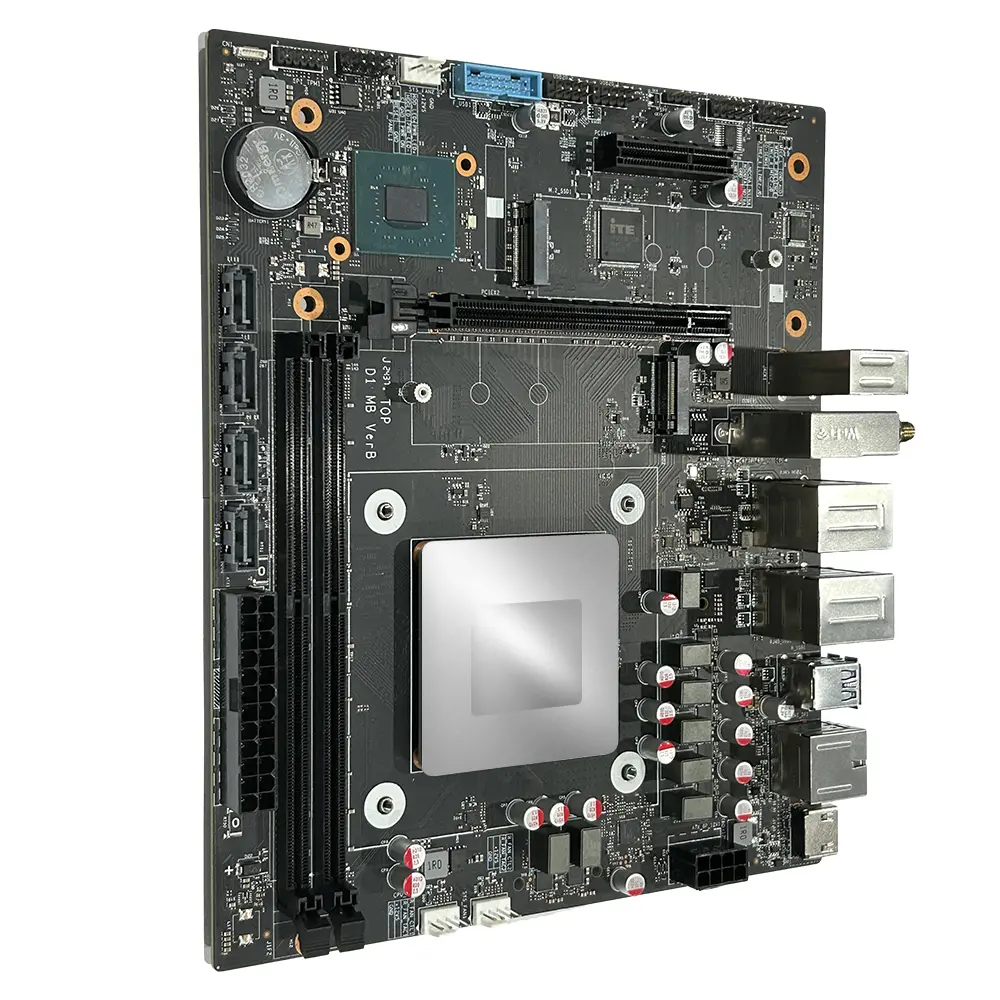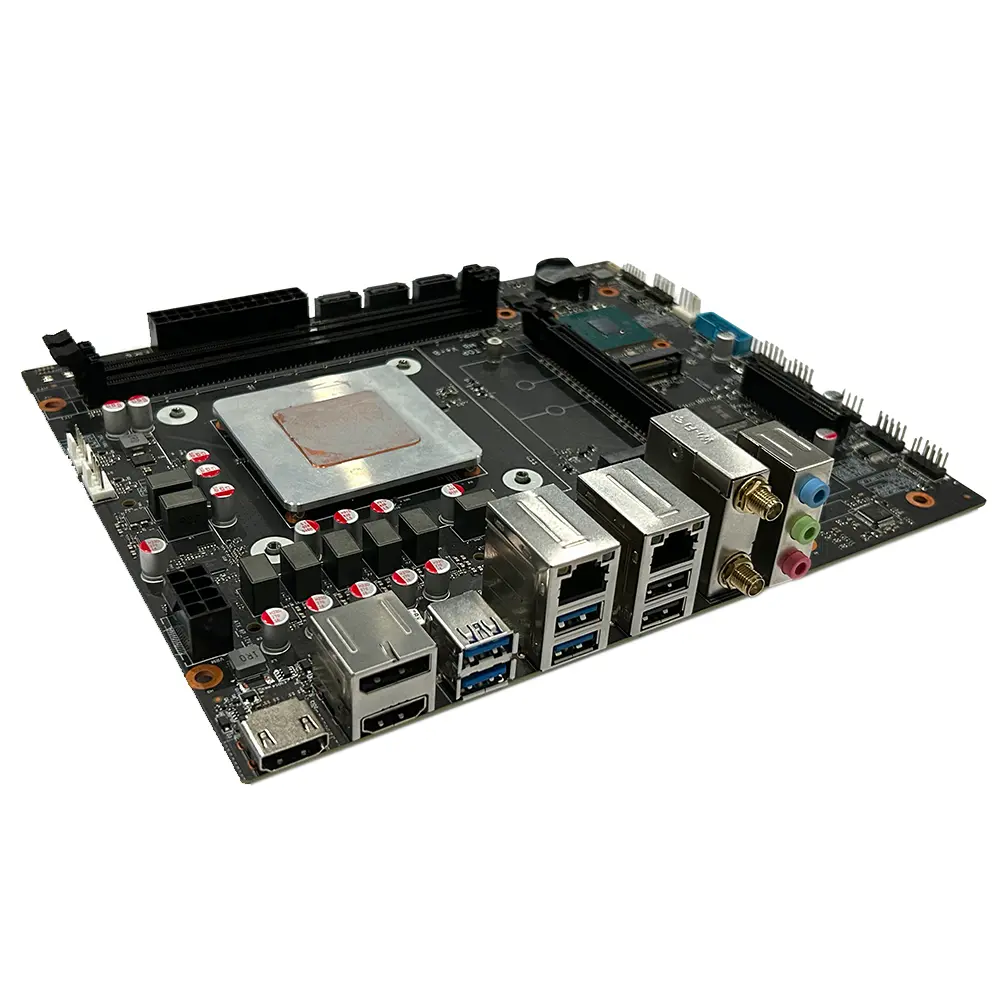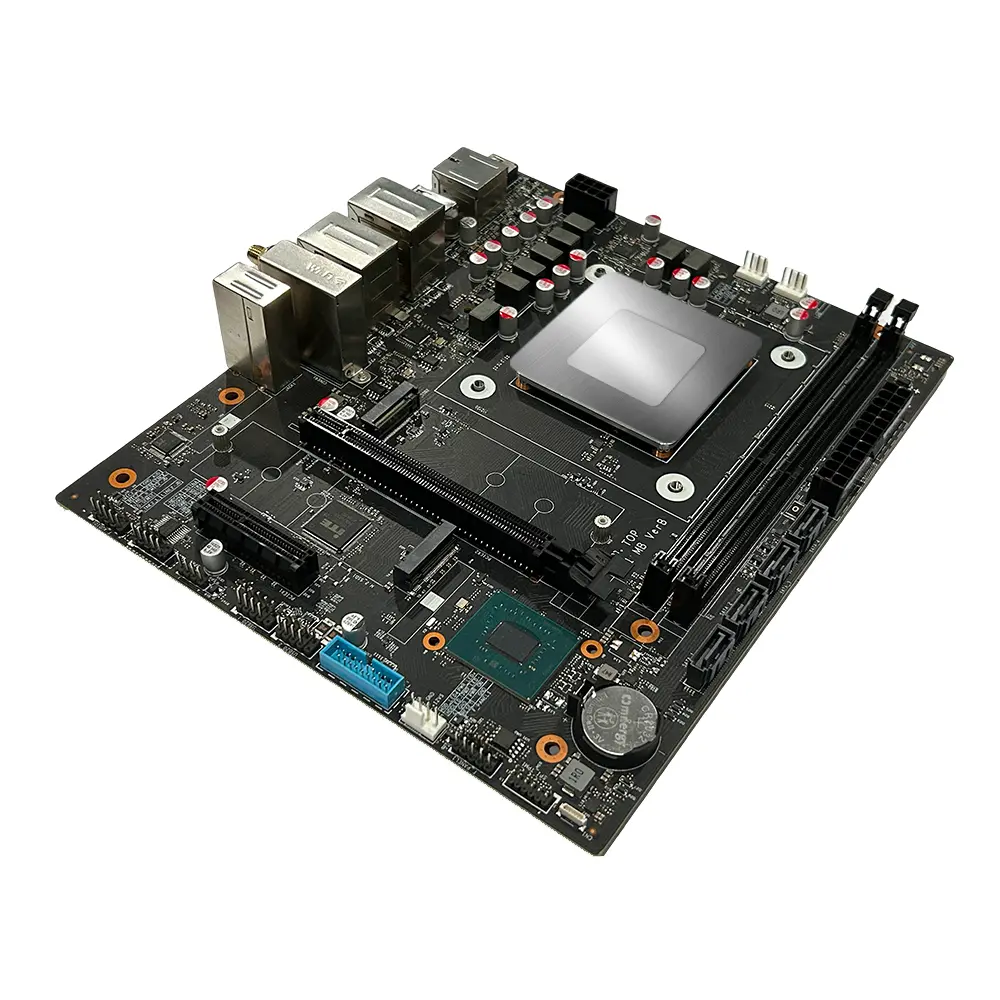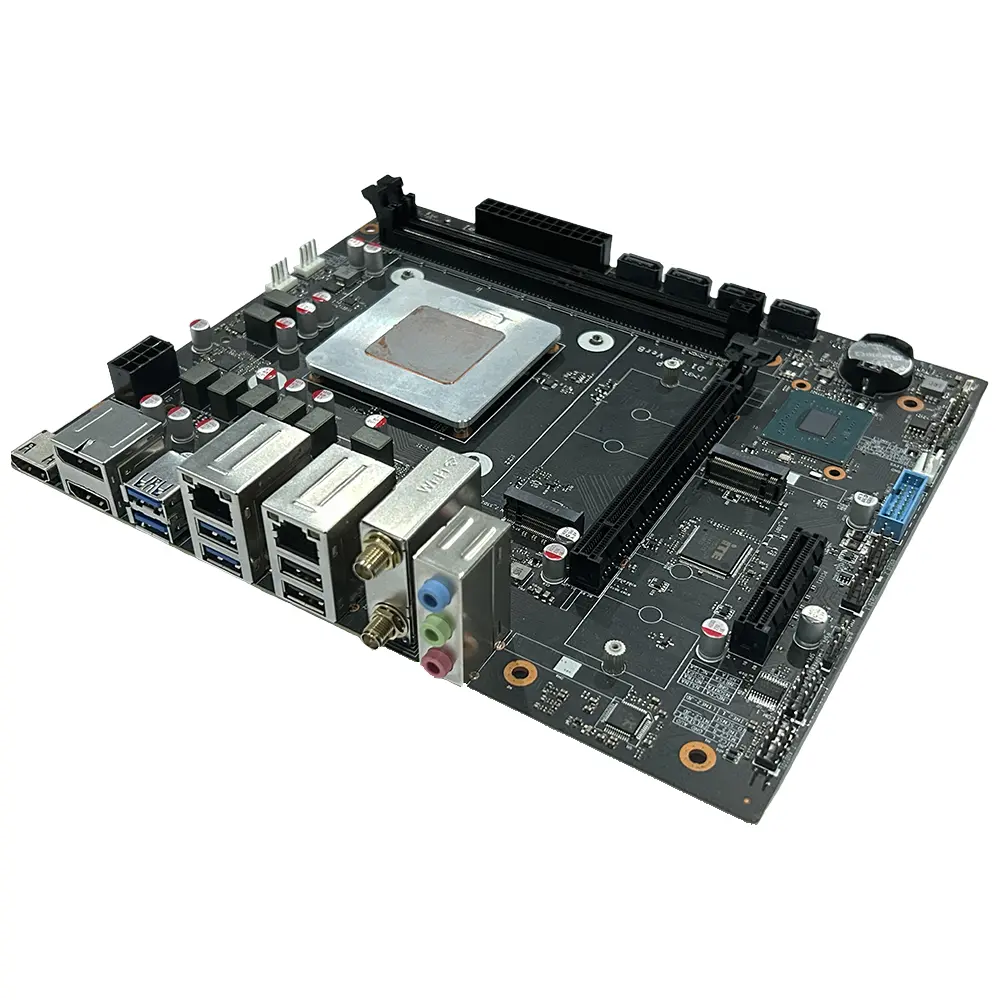
Custom China Factory Suppliers: High-End D1 Motherboards for Intel Raptor Lake HX i7/i5 Processors - Micro ATX Design Product, Factory

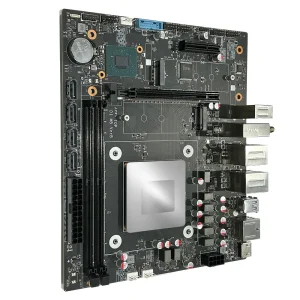
Introducing the D1 product model, a cutting-edge solution designed for performance enthusiasts. Powered by Intel's latest Raptor Lake HX 13th generation CPUs, including options such as the Intel i7-13700HX, i5-13600HX, and i5-13500HX, this model guarantees impressive processing capabilities with a TDP of 55W, The D1 features two DDR5 UDIMM memory slots supporting up to 96GB, making it ideal for demanding applications and multitasking. Its compact Micro ATX size, measuring 225mm x 190mm, ensures compatibility with a wide range of systems while maintaining a sleek design, As one of the leading suppliers and manufacturers in China, we ensure high-quality standards and excellent performance for our products. Choose D1 for a powerful computing experience delivered by a trusted factory that meets your needs

Product Description

Product Detailed Specification
Mainboard Chip
Main chipsetIntel® HM670/HM770 and other PCH
Audio chipBuilt-in HD sound chip
Network card chipBoard network card chip
Processor Specifications
CPU typeIntel i7-13700HX / i5-13600HX / i5-13500HX, etc.
CPU platformIntel Raptor Lake HX 13th Gen CPU TDP: 55W
Video cardIntel® UHD Graphics
Memory Specifications
Memory typeDDR5 4800MHz / 5600MHz
Memory slots2 × DDR5 UDIMM up to 96GB
Expansion Slots
WiFi slot1 × M.2 2230 slot (support WIFI/BT) WIFI: 802.11 b/g/n/AC/AX Bluetooth 4.0 or above
SSD slot1 × M.2 2280 slot (supports NVMe PCIe 4.0 x4)
1 × M.2 2280 slot (supports NVMe PCIe 3.0 x4)
PCIe card slot1 × M.2 2280 slot (supports NVMe PCIe 4.0 x4)
1 × M.2 2280 slot (supports NVMe PCIe 3.0 x5)
External Interface
Power portATX source
Display interface2 × HDMI Out 2.0 1 × DP 1.4
Network interface1 × RJ45 1000M
1 × RJ45 2500M
USB ports4 × USB 3.2 Gen1 2 × USB 2.0
Audio interface1 × Line Out
1 × Line In
1 × MIC In
Built-in Connector Specifications
Power interfaceATX power interface 24+8 PIN
COM port1 × RS232 (Dupont dual-row 9-pin 2.54mm)
Built-in audio interface1 × F_Audio (Dupont dual-row 9-pin 2.54mm)
Plug-in socket4 × SATA 3.0 ports
TPM contact pin1 × dual-row 11Pin 2.0mm
USB 3.0 Wafer1 × dual-row USB 3.0 pin 20PIN 2.0mm
USB 2.0 plug2 × dual-row USB 2.0 connectors (Dupont dual-row 9-pin 2.54mm)
Beeper pin1 × SPKER 4Pin 2.54mm
Board-mounted pins1 × CPU_FAN 4PIN
2 × SYS_FAN 4PIN
Other Parameters
Size of motherboard225mm × 190mm
BIOS supportAMI UEFI BIOS, PXE, WOL
Work environmentTemperature: 0 ~ 40℃ | Humidity: 5% ~ 95% (no condensation)
Storage environmentTemperature: -20 ~ 70℃ | Humidity: 5% ~ 95% (no condensation)
Tips for Safe Use
  • 1Before using this product, please be sure to read the product manual carefully.
  • 2For boards that are not ready to be installed, they should be stored in anti-static protective bags.
  • 3Before taking out the board from the anti-static protective bag, you should first place your hands on a grounded metal object for a while.
  • 4When holding the board, you need to wear anti-static protective gloves.
  • 5To avoid electric shock or damage, turn off the AC power before plugging or reconfiguring.
  • 6Before moving the board or the whole machine, you must turn off the AC power.
  • 7When adding or reducing boards, be sure to turn off the AC power first.
  • 8Before connecting or unplugging any device, you must turn off the AC power.
  • 9Wait at least 30 seconds before turning it on again after shutting down to avoid frequent power cycle damage.
The diagram is for reference only, please refer to the actual product.
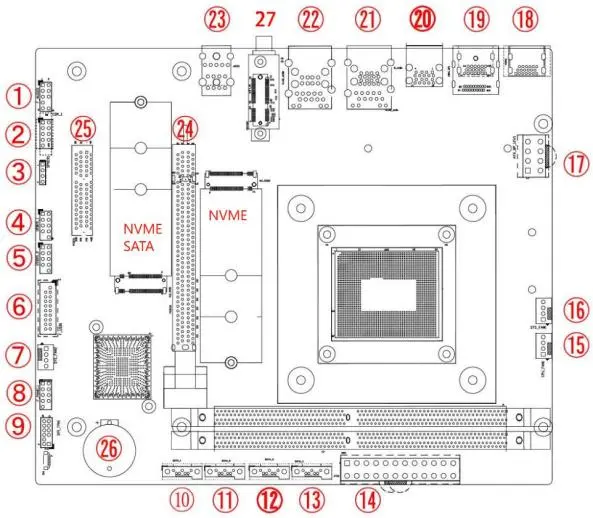
Motherboard Diagram
No.Description No.Description
1F_Audio: Built-in audio interface15CPU fan interface
2COM: Built-in serial port16SYS fan interface
3Buzzer17ATX_8PIN 12V interface
4USB 2.0 pin 9PIN18HDMI 2.0 port
5USB 2.0 pin 9PIN19DP + HDMI port
6USB 3.0 front panel interface20USB 3.0 dual-layer interface
7SYS fan interface21RJ45 (1G) + 2 × USB 3.1 ports
8F_Panel: Built-in switch panel interface22RJ45 (2.5G) + 2 × USB 2.0 ports
9TPM pin 11PIN23Headset jack
10Built-in SATA port24PCIe x16 port (optional)
11Built-in SATA port25PCIe x4 interface (optional)
12Built-in SATA port26RTC battery interface
13Built-in SATA port27M.2 WIFI/BT support WIFI6
Safety Tips
  • Do not tear off the serial number and warranty sticker on the motherboard.
  • Turn off the power and unplug the cord before installing or removing hardware.
  • Make sure the connector and socket are tightly connected.
  • Avoid touching metal wiring to prevent short circuits.
  • It is best to wear an anti-static wristband when handling the CPU or memory.
  • Place the motherboard on an anti-static mat or bag before installation.
  • Verify power supply voltage matches standard values before turning on power.
  • Ensure all cables and power cords are correctly connected.
  • Avoid contact between screws and circuits on the motherboard.
  • Do not place the computer host in unstable or high-temperature environments.
  • Turning on the power during installation may cause severe damage.
  • Consult a professional technician if you encounter technical problems.
Memory Installation
The motherboard provides 2 × 260 Pin DDR5 U-DIMM memory slots.
  • 1Ensure memory is compatible with motherboard specifications.
  • 2Turn off computer power before installing or removing memory.
  • 3Align the foolproof mark correctly; do not force insertion.
  • 4Unplug the AC power cord before starting.
  • 5Hold both ends of the stick and avoid metal contacts.
  • 6Align gold fingers with the slot's convex point.
  • 7Insert vertically and press down until you hear a "click".
  • 8To remove, push latches at both ends outward simultaneously.
Frequently Asked Questions (FAQ)
What processors can I use with this motherboard?
It is compatible with 13th Gen Intel Raptor Lake HX series, such as i7-13700HX, i5-13600HX, and i5-13500HX, featuring a 55W TDP.
What is the memory limit for this board?
You can install up to 96GB of DDR5 memory (4800MHz or 5600MHz) using the two UDIMM slots provided.
How many SSDs can I install?
The board supports two M.2 2280 NVMe SSDs (one PCIe 4.0 x4 and one PCIe 3.0 x4) and four SATA 3.0 ports for additional storage.
Does this motherboard support multiple displays?
Yes, it features two HDMI 2.0 outputs and one DisplayPort 1.4 output for multi-monitor setups.
What are the networking options?
It includes dual RJ45 ports (one 1000M and one 2500M) and an M.2 slot for WiFi/Bluetooth expansion.
What precautions should I take against static electricity?
Always use an anti-static wristband or touch a grounded metal object before handling the board, and keep components in anti-static bags when not installed.

Related Products