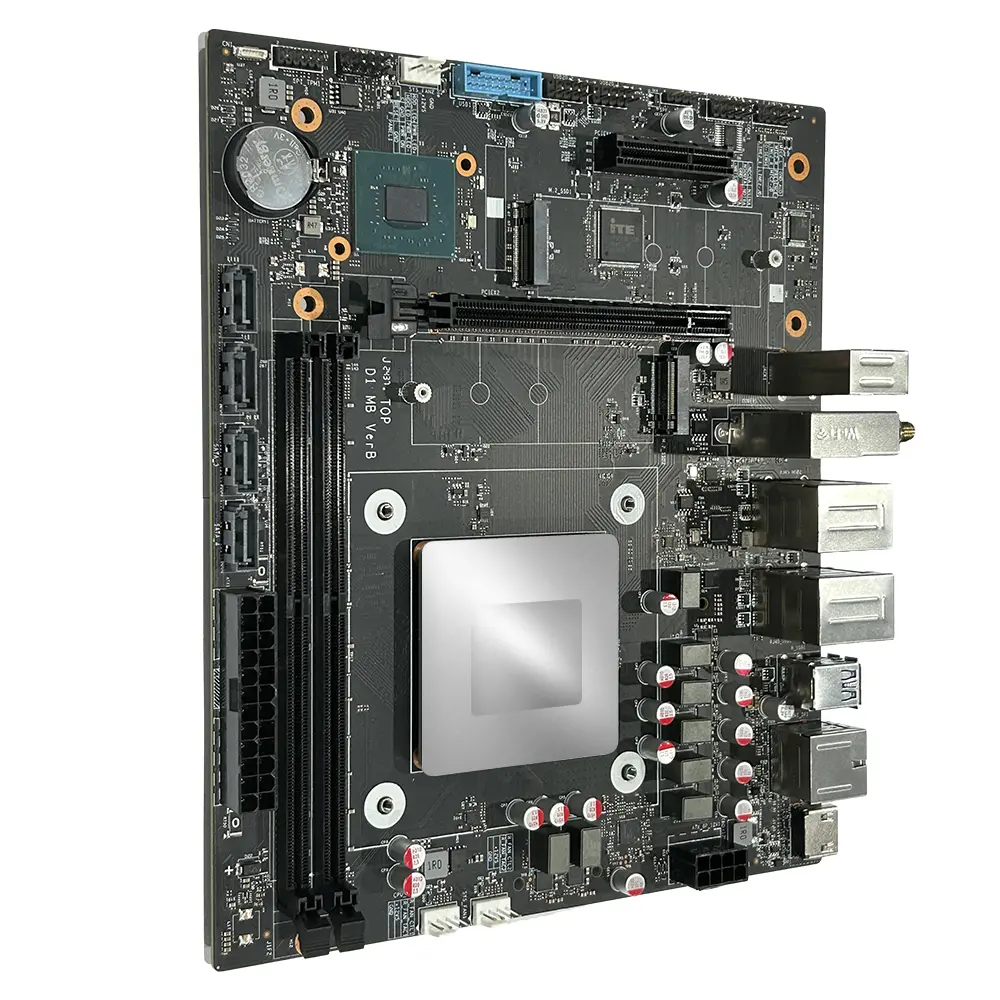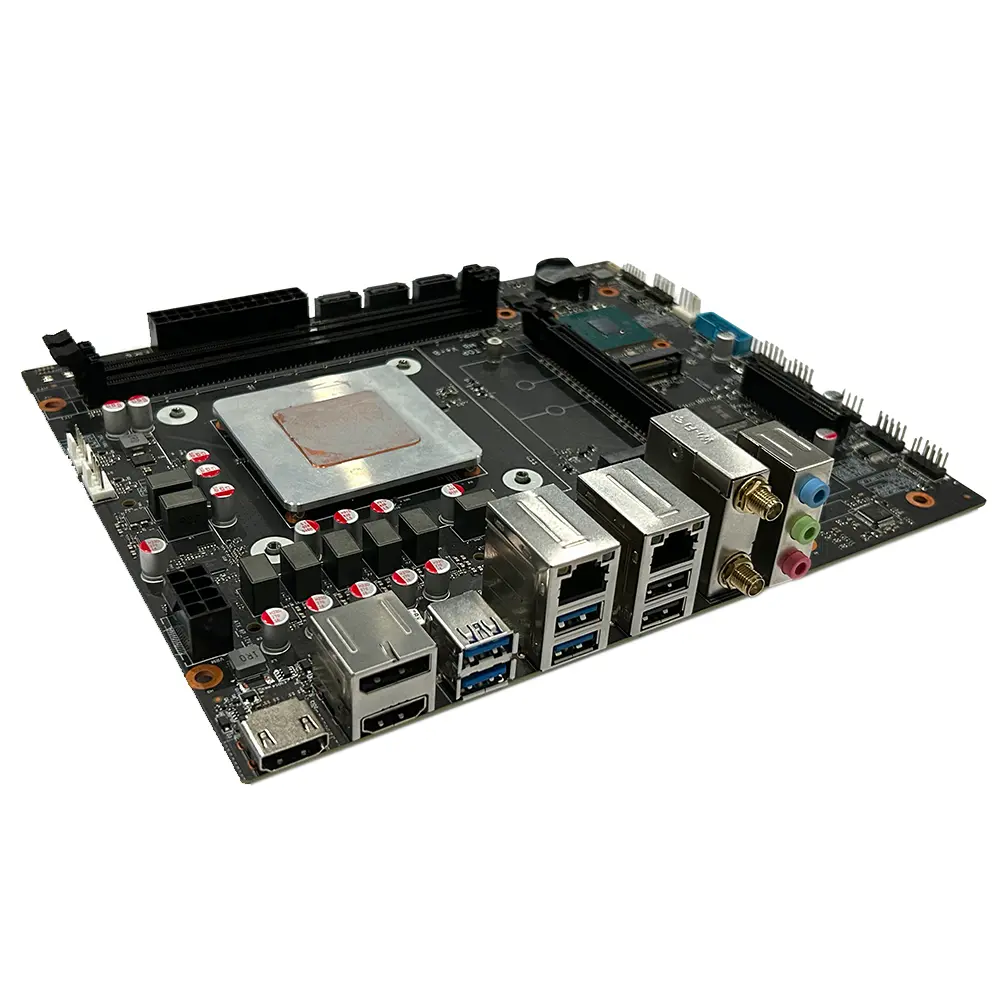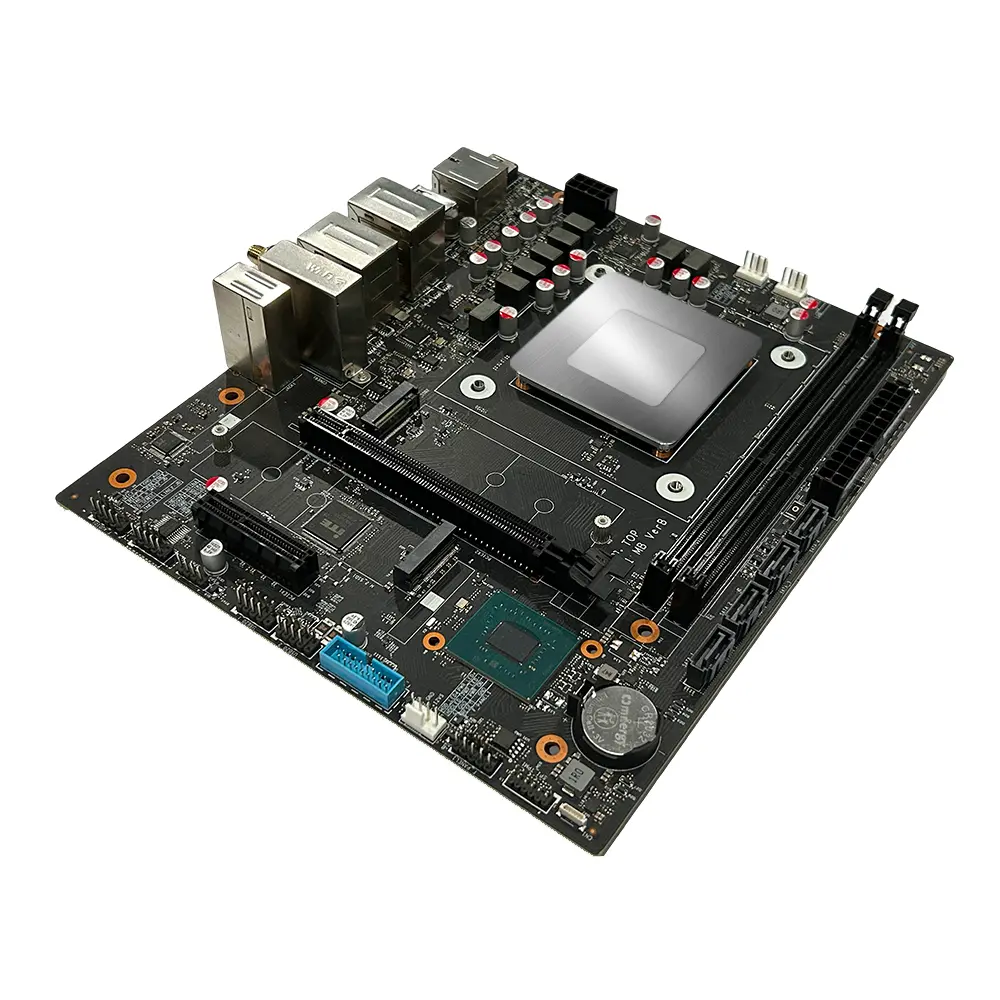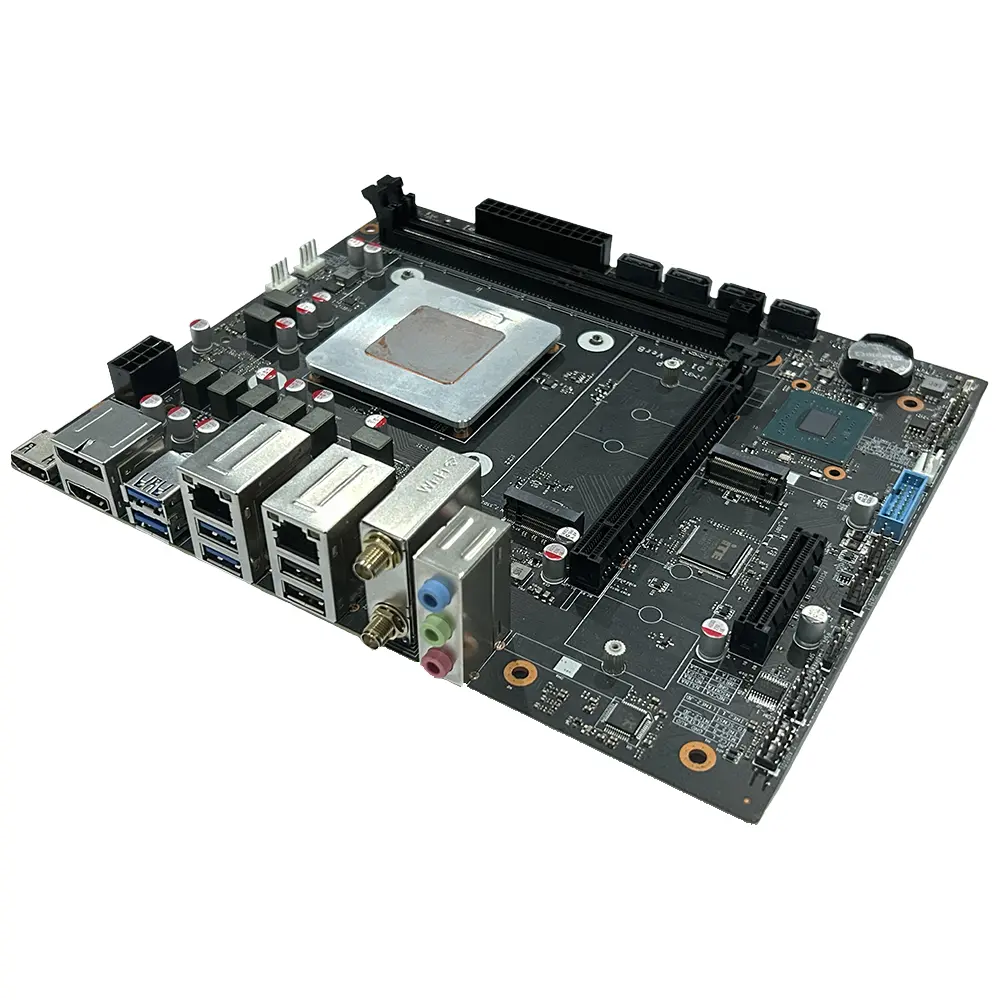
Custom Mid-to-High-End Computer Motherboards - D1 Model from China Suppliers and Factory, Intel i7/i5 Compatible Companies, Company

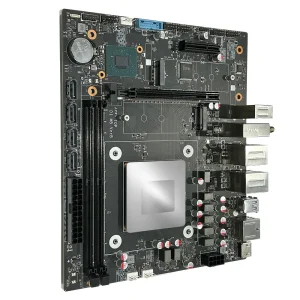
Discover the latest in high-performance computing with our D1 model, crafted from a leading factory in China. This advanced system features powerful Intel i7-13700HX, i5-13600HX, and i5-13500HX processors, ensuring exceptional speed and efficiency for all your computing needs, Built on the robust Intel Raptor Lake HX architecture, the CPU operates at a TDP of 55W, providing a balance of performance and energy efficiency. The D1 model supports 2 x DDR5 UDIMM memory slots, accommodating up to 96GB of high-speed memory, ideal for multitasking and demanding applications, Compactly designed with dimensions of 225mm x 190mm, this Micro ATX (M-ATX) motherboard fits seamlessly into any setup. This product not only represents cutting-edge technology but also exemplifies the quality that you can expect from top suppliers in the industry. Upgrade your system today with the D1 model, where innovation meets reliability, straight from our trusted factory in China

Product Description

Product Detailed Specification
Mainboard Chip
Main chipsetIntel® HM670/HM770 and other PCH
Audio chipBuilt-in HD sound chip
Network card chipBoard network card chip
Processor Specifications
CPU typeIntel i7-13700HX / i5-13600HX / i5-13500HX, etc.
CPU platformIntel Raptor Lake HX 13th Gen CPU | TDP: 55W
Video cardIntel® UHD Graphics
Memory Specifications
Memory typeDDR5 4800MHz / 5600MHz
Memory slots2 × DDR5 UDIMM, up to 96GB
Expansion Slots
WiFi slot1 × M.2 2230 slot (support WIFI/BT)
WIFI: 802.11 b/g/n/AC/AX | Bluetooth 4.0 or above
SSD slot1 × M.2 2280 slot (supports NVMe PCIe 4.0 x4)
1 × M.2 2280 slot (supports NVMe PCIe 3.0 x4)
PCIe card slot1 × M.2 2280 slot (supports NVMe PCIe 4.0 x4)
1 × M.2 2280 slot (supports NVMe PCIe 3.0 x5)
External Interface
Power portATX source
Display interface2 × HDMI Out 2.0 | 1 × DP 1.4
Network interface1 × RJ45 1000M
1 × RJ45 2500M
USB ports4 × USB 3.2 Gen1 | 2 × USB 2.0
Audio interface1 × Line Out | 1 × Line In | 1 × MIC In
Built-in Plug-in Specifications
Power interfaceATX power interface 24+8PIN
COM port1 × RS232 (Dupont dual-row 9-pin 2.54mm)
Built-in audio interface1 × F_Audio (Dupont dual-row 9-pin 2.54mm)
Plug-in socket4 × SATA 3.0 ports
TPM contact pin1 × dual-row 11Pin 2.0mm
USB 3.0 Wafer1 × dual-row USB 3.0 pin 20PIN 2.0mm
USB 2.0 plug2 × dual-row USB 2.0 connectors (Dupont dual-row 9-pin 2.54mm)
Beeper pin1 × SPKER 4Pin 2.54mm
Board-mounted pins1 × CPU_FAN 4PIN
2 × SYS_FAN 4PIN
Other Parameters
Motherboard size225mm × 190mm
BIOS supportAMI UEFI BIOS, PXE, WOL
Work environmentTemperature: 0 ~ 40°C | Humidity: 5% ~ 95% (no condensation)
Storage environmentTemperature: -20 ~ 70°C | Humidity: 5% ~ 95% (no condensation)
Tips for Safe Use
1Before using this product, please be sure to read the product manual carefully.
2For boards that are not ready to be installed, they should be stored in anti-static protective bags.
3Before taking out the board from the anti-static protective bag, you should first place your hands on a grounded metal object for a while (e.g., 10 seconds) to release the static electricity in your body and hands.
4When holding the board, you need to wear anti-static protective gloves, and you should develop the habit of only touching its edges.
5To avoid electric shock or damage to the product, you must turn off the AC power before plugging or reconfiguring the board.
6Before moving the board or the whole machine, you must turn off the AC power.
7For the whole machine product, when adding or reducing boards, be sure to turn off the AC power first.
8Before you need to connect or unplug any device, you must turn off the AC power.
9To avoid unnecessary damage due to frequent power cycling, you should wait at least 30 seconds before turning it on again after shutting down.
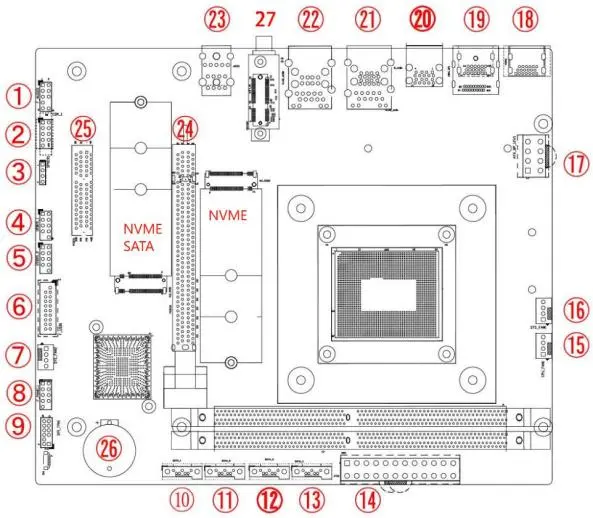
ℹ️ The diagram is for reference only. Please refer to the actual product.
No.DescriptionNo.Description
1F_Audio: Built-in audio interface15CPU fan interface
2COM: Built-in serial port16SYS fan interface
3Buzzer17ATX_8PIN 12V interface
4USB 2.0 pin 9PIN18HDMI 2.0 port
5USB 2.0 pin 9PIN19DP + HDMI port
6USB 3.0 front panel interface20USB 3.0 dual-layer interface
7SYS fan interface21RJ45 (1G) + 2 × USB 3.1 ports
8F_Panel: Built-in switch panel interface22RJ45 (2.5G) + 2 × USB 2.0 ports
9TPM pin 11PIN23Headset jack
10Built-in SATA port24PCIe x16 port (optional)
11Built-in SATA port25PCIe x4 interface (optional)
12Built-in SATA port26RTC battery interface
13Built-in SATA port27M.2 WIFI/BT — supports WiFi 6
14ATX_24Pin power interface
Safety Tips
Do not tear off the serial number and agent warranty sticker on the motherboard before installation, otherwise it will affect the recognition standard of the product warranty period.
Before installing or removing the motherboard and other hardware devices, be sure to turn off the power and unplug the power cord from the socket.
When installing other hardware devices to the socket inside the motherboard, please make sure that the connector and the socket are tightly connected.
When taking the motherboard, please try not to touch the metal wiring part to avoid short circuit.
When taking the motherboard, CPU, or memory stick, it is best to wear an anti-static wristband. If there is no anti-static wristband, make sure your hands are dry and touch metal objects first to eliminate static electricity.
Before installing the motherboard, please place it on an anti-static mat or anti-static bag.
When you want to unplug the plug from the motherboard power socket, make sure the power supply is turned off.
Before turning on the power, make sure that the voltage value of the power supply is set to the voltage standard value in the window.
Before turning on the power, make sure that the cables and power cords of all hardware devices are correctly connected.
Do not allow the screws to contact the circuits or parts on the motherboard to avoid damage or malfunction of the motherboard.
Make sure there are no screws or metal products left on the motherboard or in the computer case.
Do not place the computer host in an unstable place.
Do not place the computer host in an environment with excessively high temperatures.
Turning on the power during installation may cause damage to the motherboard, other devices, or yourself.
If you are not familiar with performing the installation, or if you encounter any technical problems using this product, please consult a professional technician.
Memory Installation
The motherboard provides 2 × 260-Pin DDR4 U-DIMM memory slots. Please read the following instructions carefully before installing memory.
1Please make sure that the memory you purchased is suitable for the specifications supported by this motherboard.
2Before installing or removing the memory, please make sure that the computer power is turned off to avoid damage.
3The memory design has a foolproof mark. If you insert the memory in the wrong direction, the memory cannot be inserted. At this time, please change the insertion direction immediately.
4Please turn off the power and unplug the AC power cord before installing or removing the memory.
5Carefully hold both ends of the memory stick and do not touch the metal contacts on it.
6Align the gold finger of the memory stick with the memory stick slot, and pay attention to the direction of the gold finger concave hole to the convex point of the slot.
7Insert the memory stick vertically into the memory slot, then press it down until you hear a "click" sound, indicating that the memory has been successfully installed. Note: Do not press down the memory stick too hard to avoid damaging the memory.
8To remove the memory stick, push the latches at both ends of the DIMM slot outward at the same time, and then take out the memory stick.
Frequently Asked Questions (FAQ)
Q What CPU types are compatible with this motherboard?
This motherboard supports Intel 13th Gen Raptor Lake HX series processors, including Intel Core i7-13700HX, i5-13600HX, and i5-13500HX, among others. The CPU TDP is 55W, and it uses the Intel HM670/HM770 PCH chipset platform.
Q How much memory can this motherboard support, and what type?
The motherboard features 2 × DDR5 UDIMM memory slots supporting DDR5 at 4800MHz or 5600MHz speeds. The maximum supported memory capacity is up to 96GB.
Q How many displays can be connected simultaneously, and which interfaces are available?
This motherboard supports up to 3 displays simultaneously via 2 × HDMI 2.0 outputs and 1 × DisplayPort 1.4 (DP 1.4), providing flexible multi-monitor configurations for workstation or digital signage use.
Q What storage expansion options does this motherboard offer?
The motherboard provides 2 × M.2 2280 NVMe SSD slots (one PCIe 4.0 x4 and one PCIe 3.0 x4), 4 × SATA 3.0 ports for traditional drives, and 1 × M.2 2230 slot for WiFi/Bluetooth modules, offering comprehensive storage flexibility.
Q What precautions should I take when handling and installing this motherboard?
Always turn off and unplug the AC power before installation. Wear an anti-static wristband or touch a grounded metal object to discharge static electricity. Handle the motherboard by its edges, avoid touching metal contacts, and place it on an anti-static mat. Never allow screws or metal objects to remain on the board before powering on.
Q What are the operating and storage environment requirements for this motherboard?
The recommended operating environment is 0°C to 40°C with 5%–95% humidity (no condensation). For storage, the temperature range is -20°C to 70°C with the same humidity conditions. Avoid placing the system in extremely hot, humid, or unstable environments to ensure long-term reliability.

Related Products